Building a CLI tool to hide messages in PDF files
By Andres • 2026-05-28
The Idea
This is an interesting project usually suggested to people looking into interesting stuff to do for a reinforced learning of the Rust Programming Language. I found it suggested somewhere online, saw it and thought was somewhat hard and above my level, but the author states that programmers that get those feelings are precisely the intended audience of his book, and that everything would make sense later down the road. Seems fun!
The first three chapters have us implementing a basic PNG file. PNG files are essentially just a list of chunks, each containing their own data. Each chunk has a type that can be represented as a 4 character string. There are standard chunk types for things like image data, but there's no rule that would prevent us from inserting our own chunks with whatever data we want, without breaking the PNG file itself. We can even tell PNG decoders to ignore our chunks, depending on how we capitalize our chunk types.

Part 1: Chunk Types
Some preparations
I decided to use the Anyhow crate. Which provides anyhow::Error, a trait object based error type for easy idiomatic error handling in Rust applications.
for now, our main function is pretty simple, but in preparation and because of Anyhow, I added the following alisases:
pub type Error = anyhow::Error;
pub type Result<T> = std::result::Result<T, Error>;
This will make things easier for us down the road, using idiomatic and more elegant error handling.
With that done, we can begin. We will be working on Chunk Types, thus, we will implement our own. These are pretty easy since they're essentially just 4 alphabetic characters. Although our Chunk Types should always be valid Chunks (more on this later), it should not be possible to construct an invalid chunk type using our public interface.
The PNG File Structure Spec will explain to us what a valid Chunk Type looks like.
Chunk naming conventions
You can read more about the specifics of how this works by visiting the PNG File Structure Spec, mentioned above. Otherwise this article would be incredibly long. The important thing bere to mention is that we will be working with a consecutive sequence of characters to form a Chunk Type and that we need to be sure it is valid, following the conventions. But of course, we have to treat these characters as bytes. In Rust, a byte can be represented as an u8. So we can also represent a vector or an array of bytes as, for example, a [u8]. A valid Chunk Type is formed by four characters exactly, and the capitalization of each character in the "string" has specific meanings. Of course, this can be considered a string, as it is a sequence of bytes that can be represented as characters. But for this, it is helpful to think of it more as just a sequence of bytes.
So, our Chunk Type type would look like the following:
pub struct ChunkType {
    chunk_type: [u8; 4],
}
Some trait implementations
And first, we should implement the FromStr trait for our Chunk type, which will allow us to get a new Chunk Type from an str, it will end up looking like the following:
impl FromStr for ChunkType {
    type Err = crate::Error;

    fn from_str(s: &str) -> crate::Result<Self> {
        if s.len() != 4 {
            return Err(anyhow!(
                "Incorrect lengh of string {} for Chunk Type. Has to be of length 4.",
                s
            ));
        }

        let mut code_vec: Vec<u8> = vec![];

        for i in s.chars() {
            if !i.is_ascii_alphabetic() {
                return Err(anyhow!("Incorrect char for Chunk Type: {}", i));
            } else {
                code_vec.push(i as u8);
            }
        }

        let code = match <[u8; 4]>::try_from(code_vec) {
            Ok(val) => val,
            Err(_err) => {
                return Err(anyhow!(
                    "Error: . Could not convert s ({}) into array of bytes",
                    s
                ));
            }
        };
        Ok(ChunkType { chunk_type: code })
    }
}
A little lengthy although I think this is good code. The main points are understanding that we of course expect a &str that is 4 in length and then we check if all of those characters are valid ascii alphabetic characters. Right now, we do not need to validate if the chunk type is valid, which would involve checking whether the characters are upper case or lower case, but that is not required right now as that is validated later.
Next, we do the implementations of TryFrom<[u8; 4]> and Display for Chunk Type, both look like the following.
impl TryFrom<[u8; 4]> for ChunkType {
    type Error = crate::Error;

    fn try_from(value: [u8; 4]) -> Result<Self, Self::Error> {
        Ok(ChunkType { chunk_type: value })
    }
}

impl std::fmt::Display for ChunkType {
    fn fmt(&self, f: &mut std::fmt::Formatter<'_>) -> std::fmt::Result {
        for c in self.chunk_type {
            write!(f, "{}", c as char)?;
        }

        Ok(())
    }
}
How these traits work
TryFrom<[u8; 4]> is deliberately minimal. The function signature guarantees we get exactly four bytes (thanks to the type system), so no length checking is needed. Full validation of the chunk type rules is handled separately in is_valid().
This follows Rust's conventions. These are conversion traits, not full constructors with validation. Their job is to turn raw data into the struct if the shape is correct (right length, character type). Also considering flexibility and separation of concerns.
Validation methods
Next, we implement the following methods for Chunk Type:
impl ChunkType {
    pub fn bytes(&self) -> [u8; 4] {
        self.chunk_type
    }

    pub fn is_valid(&self) -> bool {
        if self.chunk_type.len() != 4 {
            return false;
        }
        for c in self.chunk_type {
            if !c.is_ascii_alphabetic() {
                return false;
            }
        }
        if !self.is_reserved_bit_valid() {
            return false;
        }
        true
    }

    pub fn is_critical(&self) -> bool {
        let bit5 = (self.chunk_type[0] & (1 << 5)) != 0;
        if bit5 {
            return false;
        }
        true
    }

    pub fn is_public(&self) -> bool {
        let bit5 = (self.chunk_type[1] & (1 << 5)) != 0;
        if bit5 {
            return false;
        }
        true
    }

    pub fn is_reserved_bit_valid(&self) -> bool {
        let bit5 = (self.chunk_type[2] & (1 << 5)) != 0;
        if bit5 {
            return false;
        }
        true
    }

    pub fn is_safe_to_copy(&self) -> bool {
        let bit5 = (self.chunk_type[3] & (1 << 5)) != 0;
        if bit5 {
            return true;
        }
        false
    }
}
These methods are what actually do the structure validation to make sure we get a correct Chunk Type, particularly is_valid().
With this, we can run our tests doing cargo test. I am not showing the contents of the tests right here, as it would take a lot of space, but you can check them in the Github repo. And after testing, we get output like the following:
cargo test
   Compiling pngme v0.1.0 (/home/andros/Programming/Rust/pngme)
    Finished `test` profile [unoptimized + debuginfo] target(s) in 0.24s
     Running unittests src/main.rs (/home/andros/Programming/Rust/pngme/target/debug/deps/pngme-bf6281b14950262c)

running 14 tests
test chunk_type::tests::test_chunk_type_from_bytes ... ok
test chunk_type::tests::test_chunk_type_from_str ... ok
test chunk_type::tests::test_chunk_type_is_critical ... ok
test chunk_type::tests::test_chunk_type_is_not_critical ... ok
test chunk_type::tests::test_chunk_type_is_not_public ... ok
test chunk_type::tests::test_chunk_type_is_public ... ok
test chunk_type::tests::test_chunk_type_is_reserved_bit_invalid ... ok
test chunk_type::tests::test_chunk_type_is_reserved_bit_valid ... ok
test chunk_type::tests::test_chunk_type_is_safe_to_copy ... ok
test chunk_type::tests::test_chunk_type_is_unsafe_to_copy ... ok
test chunk_type::tests::test_chunk_type_string ... ok
test chunk_type::tests::test_chunk_type_trait_impls ... ok
test chunk_type::tests::test_invalid_chunk_is_valid ... ok
test chunk_type::tests::test_valid_chunk_is_valid ... ok

test result: ok. 14 passed; 0 failed; 0 ignored; 0 measured; 0 filtered out; finished in 0.00s
Pretty. Of course, I wanted to show the output of some unit tests here but I'll mostly omit them for the rest of the devlog. Again, if you want to see them you can check them out in the Github repo of this project. There was unit tests for every major part of this project:
- chunk_type.rs
- chunk.rs
- png.rs
Part 2: Chunks
Now that we have our Chunk Type type working correctly, we can move on to form some Chunks. This was one of the trickiest parts since we need to actually read and work with some varieble-length data.
So, the thing is, a PNG file consists of a PNG signature, followed by a series of chunks.
The PNG file signature
The first eight bytes of a PNG file always contain the following (decimal) values:
137 80 78 71 13 10 26 10
The signature indicates, that the reminder of the file contains a single PNG image, consisting of a series of chunks beginning with an IHDR chunk and ending with an IEND chunk.
Chunk layout
Once again, we will be needing the PNG File Structure.
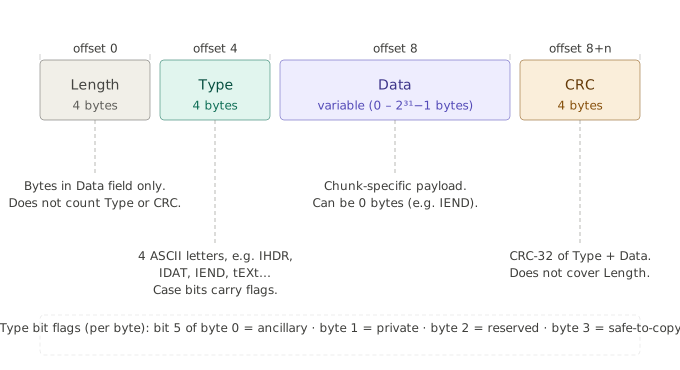
Each Chunk consists of four parts:
length
A 4-bytes unsigned integer giving the number of bytes in the chunk's data field. The length counts only the data field, not itself, the chunk type code, or the CRC. Zero is a valid length.
Chunk Type
A 4-byte chunk type code. For convenience in description and in examining PNG files, type codes are restricted to consist of uppercase and lowercase ASCII letters (A-Z and a-z, or 65-90 and 97-122 decimal). However, encoders and decoders must treat the codes as fixed binary values, not character strings.
Chunk Data
The data bytes appropriate to the chunk type, if any. This field can be of zero length.
CRC
A 4-byte CRC (Cyclic Redundancy Check) calculated on the preceding bytes in the chunk, including the chunk type code and chunk data fields, but not including the length field. The CRC is always present, even for chunks containing no data.
The Chunk data length can be any number of bytes up to the maximum; therefore, implementors cannot assume that chunks are aligned on any boundaries larger than bytes.
Chunks can appear in any order, subject to the restrictions placed on each chunk type. (One notable restriction is that IHDR must appear first and IEND must appear last; thus the IEND chunk serves as an end-of-file marker.) Multiple chunks of the same type can appear, but only if specifically permitted for that type.
Implementation
Our Chunk type then, would look like the following:
pub struct Chunk {
    length: u32,
    chunk_type: ChunkType, // Our custom 4-byte type
    data: Vec<u8>,
    crc: u32,
}
This reminds us of the importance of understanding types and their sizes and why a certain type is the most adecuate for what purpose.
Here it is particularly convenient to be able to use a Vec to store the actual data. As we do not know at compile time how much space we might need. This is both modern programming practices and idiomatic Rust.
Necessary traits
TryFrom
First, we should work on implementing the TryFrom trait, more especifically, TryFrom<&[u8]>, and it looks like follows:
impl TryFrom<&[u8]> for Chunk {
    type Error = crate::Error;

    fn try_from(value: &[u8]) -> Result<Self, Self::Error> {
        let mut reader = BufReader::new(value);
        let mut length_and_data_buffer: [u8; 4] = [0u8; 4];

        // Read length
        reader.read_exact(&mut length_and_data_buffer)?;
        let length = <u32>::from_be_bytes(length_and_data_buffer);

        // Read Chunk Type
        reader.read_exact(&mut length_and_data_buffer)?;
        let chunk_type = ChunkType::try_from(length_and_data_buffer)?;

        // Read Data
        let mut data_buffer: Vec<u8> = vec![0; length.try_into().unwrap()];
        reader.read_exact(&mut data_buffer)?;

        // Read CRC
        let mut crc_buffer: [u8; 4] = [0u8; 4];
        reader.read_exact(&mut crc_buffer)?;
        let crc = <u32>::from_be_bytes(crc_buffer);

        // Chaining chunk type and data buffers to calculate and compare CRC
        let chunk_type_and_data: Vec<u8> = chunk_type
            .bytes()
            .iter()
            .cloned()
            .chain(data_buffer.iter().cloned())
            .collect();

        // Get crc and compare with what we got above
        const X25: crc::Crc<u32> = crc::Crc::<u32>::new(&crc::CRC_32_ISO_HDLC);
        let calculated_crc = X25.checksum(&chunk_type_and_data);

        // Do the comparison
        if calculated_crc != crc {
            return Err(anyhow!("Crc mismatch!"));
        }

        Ok(Chunk {
            length: length,
            chunk_type: chunk_type,
            data: data_buffer,
            crc: crc,
        })
    }
}
This ended up being a somewhat long-ish function but I believe it is clean, readable and idiomatic Rust code.
the function signature;
fn try_from(value: &[u8]) -> Result<Self, Self::Error> {}
Makes it clear that we are receiving a slice of bytes, i.e. a stream if you may, out of which we need to orderly read from and structure the data in the way we need it.
We first read the length which indicates how long will the actual data we need to read will be, then the chunk type, which we then use its bytes to actually create our Chunk Type field using the methods we wrote in the last section. And then we proceed with reading the actual data specifying how much to read, because of the length we got before. And so on, with the CRC field.
Notice how we're using a BufReader, a type provided by the Rust standard library, which lives in the std::io module. This allows us to idiomatically and cleanly and safely read section by section (in order to not use the term chunk and generate redunancy) of said bytes stream, without having to keep track of a position by ourselves.
We finally generate a crc using the crc crate and compare the resulting crc with what we read from the byte stream. If they match, we finally have a correct Chunk which we can return.
Display
The Display trait is interesting because if done poorly, we could be printing a huge number of nonsense for the user, which wouldn't be useful at all. Here's a somewhat decent implementation to report some useful data:
impl Display for Chunk {
    fn fmt(&self, f: &mut std::fmt::Formatter<'_>) -> std::fmt::Result {
        writeln!(f, "Chunk Type: {}", self.chunk_type)?;
        writeln!(f, "Length: {}", self.length)?;
        if let Ok(data_value) = self.data_as_string() {
            writeln!(f, "Data: {}", data_value)?;
        } else {
            writeln!(f, "[Binary data - {} bytes]", self.data.len())?;
        }
        writeln!(f, "CRC : {}", self.crc)?;

        Ok(())
    }
}
With this implementation, we get a nice little header, the number of chunks, and a list of all chunks giving their type, their length, data if found, or a fallback if the data is not valid UTF-8, and the CRC.
Methods
Here's the methods we will need and their implementations:
impl Chunk {
    pub fn new(chunk_type: ChunkType, data: Vec<u8>) -> Chunk {
        // Chaining chunk_type and data for CRC
        let chunk_type_and_data: Vec<u8> = chunk_type
            .bytes()
            .iter()
            .cloned()
            .chain(data.iter().cloned())
            .collect();

        // Calculate CRC
        const X25: crc::Crc<u32> = crc::Crc::<u32>::new(&crc::CRC_32_ISO_HDLC);
        let calculated_crc = X25.checksum(&chunk_type_and_data);

        Chunk {
            length: data.len() as u32,
            chunk_type,
            data,
            crc: calculated_crc,
        }
    }

    pub fn length(&self) -> u32 {
        self.length
    }

    pub fn chunk_type(&self) -> &ChunkType {
        &self.chunk_type
    }

    pub fn data(&self) -> &[u8] {
        &self.data
    }

    pub fn crc(&self) -> u32 {
        self.crc
    }

    pub fn data_as_string(&self) -> crate::Result<String> {
        let result = String::from_utf8(self.data.clone())?;
        Ok(result)
    }

    pub fn as_bytes(&self) -> Vec<u8> {
        // Bytes of length
        let length_bytes: Vec<u8> = self.length.to_be_bytes().into();
        // Bytes of Chunk Type
        let chunk_type_bytes: Vec<u8> = self.chunk_type.bytes().to_vec();
        // Data bytes
        let data = &self.data;
        // Crc bytes
        let crc: Vec<u8> = self.crc.to_be_bytes().to_vec();

        let result: Vec<u8> = length_bytes
            .iter()
            .cloned()
            .chain(chunk_type_bytes.iter().cloned())
            .chain(data.iter().cloned())
            .chain(crc.iter().cloned())
            .collect();
        result
    }
}
Most of these methods are just getters, but it is worth it to stop and talk a little about new(). We can notice that the new method is considerably similar to the important TryFrom<&[u8]> implementation. The logic is simple: We received an already formed ChunkType and a Vec
This time around, we can directly chain the bytes of the chunk type and the data fields and then just calculate their corresponding crc.
For as_bytes(), we also need to do some, albeit a little more interesting chain sequence, and then we return all the bytes of the Chunk as a Vec
So this ends up being a matter of being somewhat used to using *.chain()*in idiomatic Rust. I'm not that good at it yet, but we're getting there.
Part 3: PNG Files
We are now finally ready to implement a full PNG File. It is very complicated.
First, we need a header (like we mentioned in the beginning of Part 2) containing 8 bytes that are always the same. Then we need a list of chunks.
Ok maybe it's not that complicated.
We will need a constructor that takes a list of Chunks, methods to append and remove chunks, and methods to return the header, a slice of chunks, and the entire PNG file as a Vec
A simple PNG representation
Simple enough, we can represent a PNG file as the following structure:
pub struct Png {
    header: [u8; 8],
    chunks: Vec<Chunk>,
}
This falls in line with what we talked about earlier, about a PNG file being simply a header, which is always the same, and a series of chunks, beginning with an IHDR chunk and ending with an IEND chunk. With this in mind, we can begin working.
First of all, we need to include our Signature Header somewhere so we can use it (mainly for comparisons) every time we need it. At first I was attempting to set it as a const at the top of the module, like so:
pub const STANDARD_HEADER: [u8; 8] = [137, 80, 78, 71, 13, 10, 26, 10];

pub struct Png { ... }
This is a module-level constant. It lives in the png module's namespace. To refer to it from outside of this module, we'd have to write png::STANDARD_HEADER. It has no relationship to the Png struct whatsoever. It just happens to live in the same file. However, our tests expected
Png::STANDARD_HEADER
This means "an associated constant on the Png type." That's different! It livs in the type's namespace, not the module's. That soon turned to be a little troublesome. The better, more idiomatic way to do this:
impl Png {
    pub const STANDARD_HEADER: [u8; 8] = [137, 80, 78, 71, 13, 10, 26, 10];
}
I mean, setting it as pub const inside the impl block of the Png type. This is like saying that now, STANDARD_HEADER belows to Png as a type, so PNG::STANDARD_HEADER, and Self::STANDARD_HEADER both resolve correctly from anywhere, including Trait impls, like what we're about to see...
Trait implementations
TryFrom<&[u8]>
Just like the TryFrom impl from chunk.rs, this was tricky but considerably fun once you get the hang of things. First, I want to show you how I initially implemented this some time ago when I first tried writing this project, it looks as the following:
impl TryFrom<&[u8]> for Png {
    type Error = Box<dyn std::error::Error>;

    fn try_from(value: &[u8]) -> Result<Self, Self::Error> {
        // Check if slice has at least enough elements to form the header of the file
        if value.len() < 8 {
            return Err("Invalid chunks. Can't be zero".into());
        } else {
            let header: &[u8] = &value[0..8];
            // Check if header corresponds to the correct standard header
            if header != Png::STANDARD_HEADER {
                return Err("Invalid header. Can't form PNG".into());
            } else {
                let mut formed_chunks: Vec<Chunk> = Vec::new();
                //let remainder: &[u8] = &value[8..];

                let mut current_position = 8;
                while current_position < value.len() {
                    if value.len() - current_position < 4 {
                        return Err("Incomplete chunk length. Therefore can't form chunk".into());
                    }

                    // Get length
                    let length_bytes = value[current_position..current_position + 4]
                        .try_into()
                        .map_err(|_| "Failed to extract chunk length")?;
                    let length = u32::from_be_bytes(length_bytes) as usize;

                    // Ensure there's enough bytes for the chunk (length + some additional fields)
                    let chunk_size = 4 + 4 + length + 4;
                    if value.len() - current_position < chunk_size {
                        return Err("Not enough bytes to form a valid chunk".into());
                    } else {
                        //let chunk_type_bytes: [u8; 4] = remainder[4 .. 8];
                        //
                        //let data: [u8; length as usize] = remainder[8 .. length as usize];
                        //let crc: [u8; 4] = remainder[8 + length as usize .. 8 + length as usize + 4];
                        //
                        //let all_bytes: Vec<u8> = length_bytes
                        //    .iter()
                        //    .chain(chunk_type_bytes.iter())
                        //    .chain(data.iter())
                        //    .chain(crc.iter())
                        //    .copied()
                        //    .collect();

                        let chunk_bytes = &value[current_position..current_position + chunk_size];

                        let chunk = Chunk::try_from(chunk_bytes)?;
                        formed_chunks.push(chunk);

                        // advance position
                        current_position += chunk_size;
                    }
                }
                Ok(Self {
                    header: header
                        .try_into()
                        .map_err(|_| "Error creating final header")?,
                    chunks: formed_chunks,
                })
            }
        }
    }
}
What a mess! Notice how I was trying to, very, very painfully, do manual byte buffer parsing, (sometimes called "index-driven slicing", or "raw slice gymnastics").
I was trying to keep track by myself of the position of something like a "cursor" through the data stream and manually "slicing", if you will, slices of bytes to read the data as I needed it, like in the lines:
// Get length
let length_bytes = value[current_position..current_position + 4]
    .try_into()
    .map_err(|_| "Failed to extract chunk length")?;
let length = u32::from_be_bytes(length_bytes) as usize;

// Ensure there's enough bytes for the chunk (length + some additional fields)
let chunk_size = 4 + 4 + length + 4;
where I was manually inserting an index in value and doing arithmetic all over the place.
This is the traditional, low-level way. No streaming, no abstraction. Just the programmer, the array, their wits, and the compiler.
Not going to lie, it builds real strength and deep understanding of what is going on. But it is "archaic" and very error prone. And again, like I said, it was PAINFUL. And it is important to mention that, when writing this first try for an implementation, I was heavily using ChatGPT as a companion. Not fully vibe-coding, but asking a lot of questions and showing him my code a lot, and THAT is the result we got? Phew, that sucks.
Not even going to talk about how much code was commented out as I was breaking my head trying to make it work. It's just bad code: very error prone, badly written, and very ugly to read.
Anyway, there is a better way, this is a more correct and idiomatic implementation:
impl TryFrom<&[u8]> for Png {
    type Error = crate::Error;

    fn try_from(value: &[u8]) -> Result<Self, Self::Error> {
        // Read header and compare
        let mut reader = BufReader::new(value);
        let mut header_buffer: [u8; 8] = [0u8; 8];
        reader.read_exact(&mut header_buffer)?;
        if header_buffer != Png::STANDARD_HEADER {
            return Err(anyhow!(
                "Can't form Png file. Incorrect header: {:?}.",
                header_buffer
            ));
        }

        // Read _length_ (4 bytes) and then try to read the rest of a possible chunk
        let mut chunks: Vec<Chunk> = Vec::new();

        // loop through the entire 'file'
        loop {
            // Buffer for length. We'll use this repeatedly as it'll dictate where and when to start reading a chunk
            let mut len_buf: [u8; 4] = [0u8; 4];
            // Check if EOF
            if reader.read_exact(&mut len_buf).is_err() {
                break;
            }
            // Get length
            let length = u32::from_be_bytes(len_buf);
            // Read Chunk Type
            let mut chunk_type_buf: [u8; 4] = [0u8; 4];
            reader.read_exact(&mut chunk_type_buf)?;
            // Read data
            let mut data_buf: Vec<u8> = vec![0; length.try_into().unwrap()];
            reader.read_exact(&mut data_buf)?;
            // Read crc
            let mut crc_buf: [u8; 4] = [0u8; 4];
            reader.read_exact(&mut crc_buf)?;

            // Chain all together and form a single Chunk vec or slice
            let chunk_bytes_vec: Vec<u8> = len_buf
                .into_iter()
                .chain(chunk_type_buf.into_iter())
                .chain(data_buf.into_iter())
                .chain(crc_buf.into_iter())
                .collect();

            // Attempt to create an actual Chunk by using Chunk::TryFrom
            let chunk = Chunk::try_from(chunk_bytes_vec.as_slice())?;
            chunks.push(chunk);
        }

        Ok(Png {
            header: header_buffer,
            chunks: chunks,
        })
    }
}
Much smaller (even counting comments) and clean!
Notice the usage of BufReader, just like we did in Part 2: Chunks. And yeah, if you're wondering, when I first tried to implement Chunks that code was also a nooby mess.
Using BufReader allows for a more ergonomic way to "seek" through the data stream.
When I finished the project and was reviewing this devlog/article to be posted, I learnt that it is actually preferable to use std::io::Cursor when it comes to dealing with data that is already in memory (a Vec
No need to manually keep track of a "cursor" and do index-driven slicing. The resulting implementation feels cleaner and more idiomatic. Granted, this implementation also has some problems, like for example, I'm doing a lot of allocations, even if small, like for those buffers, but still they could add up, also using many vectors. So yeah, everything has some downsides and most importantly:
I suppose this could have been done even better by a more experienced Rust dev, but for now it works.
The implementation of Display is somewhat trivial so I'll omit for now to keep moving.
Methods
To begin, let's see the STANDARD_HEADER const and the from_chunks() method, which allows us to form a valid Png given a collection of Chunks:
impl Png {
    pub const STANDARD_HEADER: [u8; 8] = [137, 80, 78, 71, 13, 10, 26, 10];

    pub fn from_chunks(chunks: Vec<Chunk>) -> Png {
        Png {
            header: Self::STANDARD_HEADER,
            chunks,
        }
    }

    [...snip...]
}
The rest of our methods for this module follow the style of what we have been doing so far, mostly getters, but we've added some useful stuff (which we will need later), like the ability to append a new chunk to a file:
pub fn append_chunk(&mut self, chunk: Chunk) {
    self.chunks.push(chunk);
}
Well, that's just doing a push on a Vec, not that big of a deal... But we also have now the ability to remove the first chunk of a given type we find:
pub fn remove_first_chunk(&mut self, chunk_type: &str) -> crate::Result<Chunk> {
    for (i, chunk) in self.chunks.iter().enumerate() {
        if chunk.chunk_type().bytes() == chunk_type.as_bytes() {
            return Ok(self.chunks.remove(i));
        }
    }
    Err(anyhow!("Did not find Chunk of type {:?}", chunk_type))
}
Here, we iterate through the chunks of the file by using enumerate(), and compare its Chunk Type with the one provided to the method, if they're the same, we both remove the Chunk from the file (by doing remove(index)), and return the given Chunk.
And, in the end, we also have as_bytes(), which returns the entire Chunk as a flow of bytes:
pub fn as_bytes(&self) -> Vec<u8> {
    let mut result: Vec<u8> = Vec::new();
    for i in self.header.iter() {
        result.push(*i);
    }

    for chunk in self.chunks.iter() {
        for i in chunk.as_bytes() {
            result.push(i);
        }
    }

    result
}
I was trying to do this by chaining a little but got a little confused and realised that I could write those for loops in like five seconds, so I just did.
With all methods in place, cargo test passed all the tests on the first damn try. The png module is done. Now we have everything we need to form png files, but we're going to take a little detour to talk about something else in the next part.
Part 4: Command Line Arguments
The hard part, and the meat of the project is finished. But now we're going to work a little into making it actually usable, and we'll do that by writing a very simple Command Line Interface.
We'll just work with commands like the following examples:
- pngmsg encode ./image.png ruSt "This is a secret message!"
- pngmsg decode ./image.png ruSt
- pngmsg remove ./image.png ruSt
- pngmsg print ./image.png
In Rust, we can grab command like arguments like so:
fn main() -> Result<()> {
    let args: Vec<String> = env::args().collect();

    Ok(())
}
Which is simple enough, but makes it tricky or laborsome when we need to do something other than, well... simply print the arguments to stdout.... And that's the reason we will use (clap)[https://docs.rs/clap/latest/clap/], a popular Rust crate for command line parsing. This will make everything easier and more ergonomic.
I will put my arguments in args.rs and it looks like follows:
#[derive(Parser)]
#[command(name = "encode")]
pub enum PngCli {
    Encode(EncodeArgs),
    Decode(DecodeArgs),
}

#[derive(clap::Args)]
#[command(version, about, long_about = None)]
pub struct EncodeArgs {
    pub filepath: String,
    pub chunk_type: String,
    pub message: String,
    pub out_filepath: Option<String>,
}

#[derive(clap::Args)]
#[command(version, about, long_about = None)]
pub struct DecodeArgs {
    pub filepath: String,
    pub chunk_type: String,
}
At first I found the Clap crate to be very confusing and it took me a while to learn what I needed in order to start working. I couldn't understand what I was supposed to do but after a while and following some examples I figured it out.
Clap allows us to write many different styles of CLI interfaces and each is a little different, but four the needs of this project, the basic idea is that we're supposed to declare the Arguments of a given Command inside structs that derive clap::Args. By doing so, clap understands that whenever one of the members of our PngCLi enum is called, it expects the arguments of that member. For example, if we call the Encode argument, we need to obligatory supply filepath, chunk_type and message, and very conveniently, we can use Rust's Option
Commands
this is an exciting part, becaues it finally glues together all of the modules and their APIs that we've been writing so far. This is the part where we structure our program to do what we want, i.e. encode and decode messages in PNG files. Consider how everything we've been writing so far are separate modules that each do a small subpart of our the task at hand, and next, we will write the actual structure of each command, all store, conveniently, in commands.rs.
First, our encode_message function, which looks like the following:
pub fn encode_message(parameters: &EncodeArgs) -> crate::Result<()> {
let path: PathBuf = PathBuf::from(¶meters.filepath);
// Sanity checks
if !path.exists() {
return Err(anyhow!("File {} doesn't exist.", &path.display()));
}
if path.extension().and_then(|s| s.to_str()) != Some("png") {
return Err(anyhow!("File must have .png extension"));
}
// Use new filepath if provided
let new_filepath = match ¶meters.out_filepath {
Some(name) => PathBuf::from(name),
None => path.clone(),
};
// Reading file and forming PNG
let file_data = fs::read(&path)?;
let mut png = Png::try_from(file_data.as_slice())?;
// Convert everything to bytes and form Chunk Type and Chunk
let message_data: Vec<u8> = parameters.message.as_bytes().to_vec();
// Chunk Type
let new_chunk_type: ChunkType = ChunkType::from_str(¶meters.chunk_type)?;
// Chunk
let hidden_msg_chunk: Chunk = Chunk::new(new_chunk_type, message_data);
// Check if safe to copy
if !hidden_msg_chunk.chunk_type().is_safe_to_copy() {
return Err(anyhow!("Could not encode message. Chunk not safe to copy."));
}
// Push new Chunk to png file
png.append_chunk(hidden_msg_chunk);
// Write output to disk
fs::write(new_filepath, png.as_bytes())?;
Ok(())
}
Notice how we do some sanity checks like at least checking if the file exists and then if the file is of .png extension.
We then proceed to read the file data with the super helpful fs::read(), create a png type with our Png::try_from(&[u8]), convert the message string to bytes, generate a Chunk Type with our ChunkType::from_str(), and generate a new Chunk of all of this with our Chunk::new(ChunkType, data). We then append the new chunk with the hidden message to our png data, using its .append_chunk() method and finally write the output to disk and return a non-error signal from the function.
I could be wrong but this fels like safe, short, easy to read and idiomatic code.
The decode_message(parameters: &DecodeArgs) function is much similar, although quite shorter. I will talk less about it and just show the code:
pub fn decode_message(parameters: &DecodeArgs) -> crate::Result<()> {
let path: PathBuf = PathBuf::from(¶meters.filepath);
if !path.exists() {
return Err(anyhow!("File {} doesn't exist.", &path.display()));
}
if path.extension().and_then(|s| s.to_str()) != Some("png") {
return Err(anyhow!("File must have .png extension"));
}
// Reading file and interpreting as PNG data
let file_data = fs::read(&path)?;
let png = Png::try_from(file_data.as_slice())?;
// loop through Chunks until we find Chunk Type
for chunk in png.chunks() {
if chunk.chunk_type().bytes() == parameters.chunk_type.as_bytes() {
let message = String::from_utf8(chunk.data().to_vec())?;
println!("Message in Chunk: {}", message);
return Ok(());
}
}
return Err(anyhow!("No matching Chunk found."));
}
The remove_message and print_file functions are also interesting in their own ways. Although for brevity (in this already big enough devlog), I will omit them, but please, if you feel curious, be free to check out the repo!
Final usage
So, for example, encode can be called exactly like we wanted before:
pngmsg encode <image.png> ruSt "hello there!"
And if successfull, the output is just silent. If we want to check an image for a hidden message, we do something like the following:
pngmsg decode <image.png> ruSt
Which used on the previous example, gives us an output like the following:
Message in Chunk: hello there!
The remove and print commands follow the same rules although their arguments, like shown in the previous sections, are different.
If we use a command incorrectly, clap already did all the heavy work for us and will report it necely:
pngmsg encode <image.png>

error: the following required arguments were not provided:
  <CHUNK_TYPE>
  <MESSAGE>

Usage: pngmsg encode <FILEPATH> <CHUNK_TYPE> <MESSAGE> [OUT_FILEPATH]
Nice!
Conclusions
A steganography tool? Me?
This program can now:
- Hide secret messages inside PNG files by creating custom chunks (like RuSt)
- Reveal those hidden messages
- Remove them
- Print the structure of the PNG file
This is classic steganography. Hiding information in plain sight without obviously changing the image. PNG files support "ancillary" chunks that most viewers ignore, so we can smuggle data without breaking the image.
When I first tried to tackle this project I was at a complete loss. Of course, like most programmers, I've been exposed to working with raw bytes before, and also back in my school days, but for whatever reasons, I was still very lost. It seemed almost as if I just could not begin writing a single line of code.
My approach was to take it a little slowly. I took some days off and focused more on other stuff and on my dayjob. I was reading, trying to exercise, and just trying to enjoy my afternoons.
One day I began slowly writing code again, and I skimmed through the Rust Book (which I had already read around a year or year and a half ago). And again, I started throwing some more lines of code around, until one day (around a week ago), I just did cargo new and the code just started flowing. It felt great.
But seriously, I feel more "seasoned" if that makes senes. I was finding ways to express my intents in the code by using Rust idioms and its tools way more easily and effortlessly than in previous times and projects.
This project forced me to deal with:
- Binary file parsing (BufReader + read_exact)
- Custom data structures and traits (TryFrom, Display)
- Proper error handling
- CLI design with clap
- Testing binary formats
Other than being happy becaues I definitely learnt a lot and was focused for around a week of coding afternoons, I have to admit the project is also quite cool. Who doesn't like this kind of "hidden messages" stuff?
Anyway, not much more to say.
Check the repo if you're interested!
Clone it, try it out, and be sure to send a lot of inadequate messages hidden in png files in your emails. Wait, is that weird? Well each his own.
Thank you for reading! Hope you enjoyed it or learnt something along with me through the way!